By LaunchVault editorial · Official sources checked
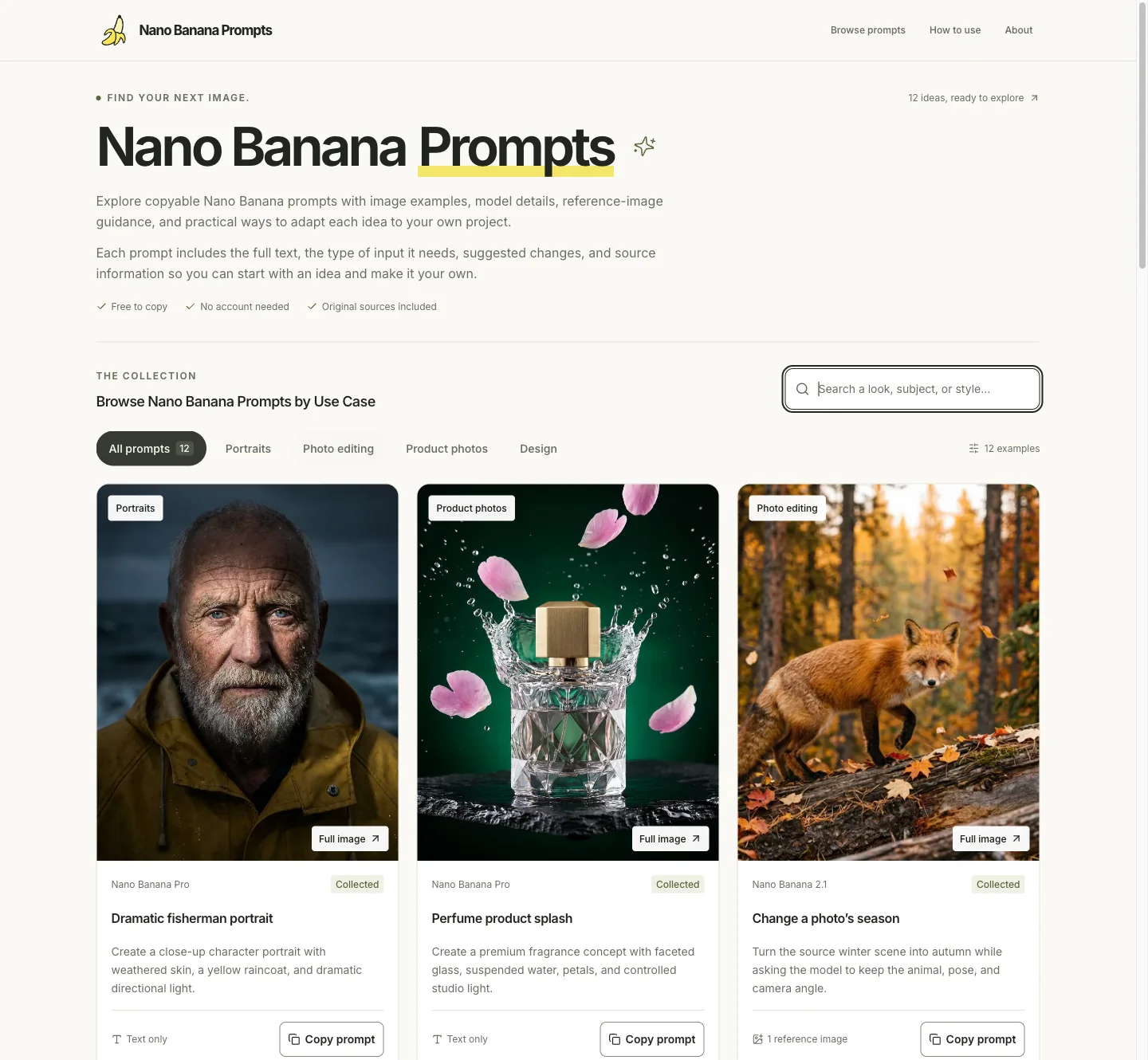
Start with a visual example instead of writing an image prompt from scratch. Nano Banana Prompts is an independent library for finding, understanding and adapting image-generation instructions. Browse a result you like, inspect its full prompt and input requirements, then take the text to your chosen image tool.
The collection checked on November 24, 2026 contained 12 examples across portraits, photo editing, product photos and design. Browsing and copying do not require an account. The site provides the reference material and guidance; image generation happens elsewhere. It is not affiliated with or endorsed by Google.
What Is Nano Banana Prompts?
The product is a visual prompt library for people working with Nano Banana and related Gemini image models. Its cards pair example images with a short explanation, a source-reported model name and an input label. Open a detail page to read the complete instruction, inspect the result and find suggestions for adapting it.
This is useful when you can recognize the image direction you want but are unsure how to describe it. The launch collection covers character portraits, seasonal edits, commercial-looking product concepts, miniature scenes and social media designs. The examples are starting points for your own work, rather than guarantees about the next image a model will produce.
Sources: Official prompt collection and FAQ · Collection scope, attribution and example labels
Find an Example by Use Case or Search
Use the four category filters to narrow the collection to portraits, photo editing, product photos or design, or return to All prompts. The search field helps find a look, subject or style. In our browser check, Photo editing showed three entries and searching the full collection for perfume returned one.
Judge the full result before choosing a prompt. Gallery previews can crop the original composition; detail pages provide a larger image and a full-image viewer. A good match has the framing, lighting and kind of input you need, even if its subject differs from yours. The published count is a review-date snapshot, not a promise of a particular update schedule.
Sources: Official prompt collection and FAQ · Official guide to choosing, copying and adapting a prompt
Text-Only Prompts, Reference Images and Model Labels
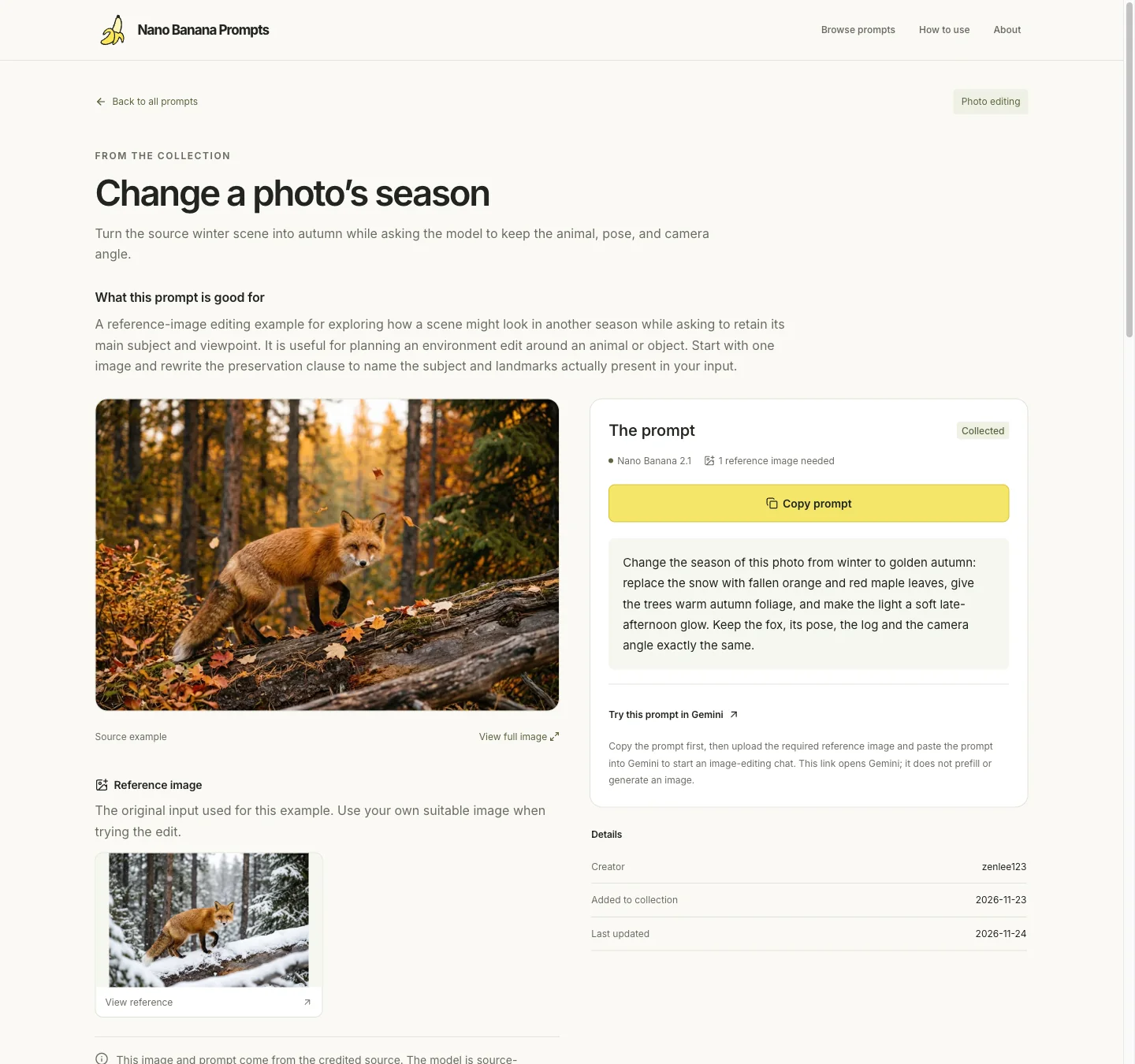
Text-only examples begin with a written description. Editing examples identify the number of reference images needed. For instance, the season-change example shows both a winter reference and an autumn result, with an instruction to preserve the animal, pose and viewpoint. Its reference image is itself an AI-generated source example.
Model labels reflect what the original source reports. The site's guide explains that a provider-specific model identifier may differ from an official Google API identifier. Check the source and the controls available in your image tool before trying to reproduce a setup; a label alone does not establish compatibility or identical behavior across services.
Use a reference that fits the instruction, and update subject-specific preservation wording when replacing it. Asking to keep a fox unchanged will not accurately describe an input showing your own product. Read the input notes and limitations before copying, especially when fidelity to a person, object or label matters.
Sources: Reference-image example: Change a photo’s season · Text-only example: Dramatic fisherman portrait · Official guide to choosing, copying and adapting a prompt
How to Copy and Adapt a Nano Banana Prompt
1. Choose a category or search for a subject. Open an example and inspect the complete result, the prompt and the required inputs. For an edit, compare the source reference with the result so you understand which details the instruction changes and which it asks to preserve.
2. Use Copy prompt on the card or detail page. The official guide also describes manually selecting the complete text if clipboard access is blocked. Open a compatible external image tool, select its generation or editing mode and supply any required reference image there.
3. Adapt one major element at a time: the subject, setting, lighting, colors or layout. Keep a copy of the original instruction. Review each result for the features that matter, then revise the relevant wording. The Gemini link opens a separate service; it does not prefill the prompt, upload a reference or generate an image for you.
Sources: Official guide to choosing, copying and adapting a prompt · Reference-image example: Change a photo’s season
What the Library Provides and What Your Image Tool Does
The useful combination is the picture, full instruction and explanation around it. Detail pages include a prompt breakdown, input guidance, adaptation examples and limitations to check. These notes help you understand the role of a lighting or preservation instruction before changing it.
Scroll sideways to see all columns
| Task | Nano Banana Prompts | Your external image tool |
|---|---|---|
| Find a starting point | Gallery, categories, search and source examples | Choose a service and model suitable for the task |
| Prepare the instruction | Full prompt, breakdown and adaptation guidance | Paste the instruction into its generation or editing interface |
| Provide an input image | Shows whether a reference is required and explains the example | Receives any image you choose to upload |
| Generate and download | Does not generate the image | Applies its own controls, pricing, quotas and export rules |
Sources: Official prompt collection and FAQ · Official guide to choosing, copying and adapting a prompt · Reference-image example: Change a photo’s season · Free browsing, source licenses and service terms
Free Browsing and External Generation Costs
The published prompts are free to browse and copy without registering. That access does not include an allocation of image-generation credits on this website. The tool you choose for generation may require an account, charge for usage or impose its own limits.
The general terms describe accounts and any paid features that may be available. Those provisions do not establish a paid gallery tier or an included generation plan. We found no reason to attach a subscription price, a daily image allowance or an unlimited-generation claim to this public collection. Features and availability can change.
Sources: Official prompt collection and FAQ · Free browsing, source licenses and service terms · Search, clipboard, analytics and external-tool privacy
Collected Examples, Source Credits and Reuse
Collected means the site has organized an existing prompt and its matching source image. It does not mean Nano Banana Prompts independently reproduced the result. The About page reserves a separate Tested label for a recorded test with a date; the launch-gallery cards we checked were labeled Collected. LaunchVault has not regenerated these examples.
The About page attributes the initial material to zenlee123's Awesome AI Image Prompts. That upstream repository releases its prompts and images under CC0. This is the source collection, rather than a verified open-source repository for the Nano Banana Prompts website itself.
The sampled detail page identifies its creator, while the About page links to the upstream collection. For reuse, check the applicable original source and license. The site's terms preserve source-license permissions; other site materials and third-party names have separate rights. An example's availability does not settle permissions for a reference image you upload or every element in a new generated result.
Sources: Collection scope, attribution and example labels · Reference-image example: Change a photo’s season · Free browsing, source licenses and service terms · Awesome AI Image Prompts: upstream examples and CC0 license
Search, Clipboard and Reference-Image Privacy
The privacy policy says gallery search and filtering run in the browser. Copying places a public prompt on the clipboard; it does not upload a personal photo to the collection or create an image. Following an external Gemini link also does not automatically transmit a prompt or image. You make that separate submission in the external tool.
Accountless browsing still involves website requests. The policy describes hosting and diagnostic processing, Umami visit analytics and collection-interaction events when enabled. It says interaction events exclude the search text and personal images, and may contain public prompt identifiers, categories, search length and result counts. These are published policy statements, not findings from an independent privacy audit.
If you later create an account, purchase a feature or send a reference to another service, the relevant account, billing and provider policies apply. Check the destination's handling of uploaded photos before using personal or client material there.
Sources: Search, clipboard, analytics and external-tool privacy · Official guide to choosing, copying and adapting a prompt
Who It Suits and Where to Go Next
The library suits beginners learning how image instructions are structured, designers exploring a visual direction, and creators or small brands preparing image concepts. A product-photo example can help you reason about composition and light; a reference edit can show how to describe both a change and the details that should remain.
Its strengths are a small browsable collection, complete instructions and guidance around each example. Its limits are equally practical: it does not provide the image model, guarantee a faithful reproduction or finish production artwork. Inspect lettering, edges, proportions and subject consistency before using a result. Final typography or retouching may still belong in your usual editor.
For broader instruction-writing tasks, our AI Prompt Tools guide covers a generator and optimizer. PhotoCraft addresses a different need: editing images directly. If you are choosing a place to run image prompts, consult LaunchVault's separate Nano Banana tools collection. These are different workflow choices, rather than interchangeable versions of this library.
Sources: Official prompt collection and FAQ · Official guide to choosing, copying and adapting a prompt · Collection scope, attribution and example labels
Review Scope
LaunchVault checked the official collection, About, usage guide, Privacy and Terms on November 24, 2026, along with text-only and reference-image detail pages and the upstream license statement. We exercised category filtering, a search and the full-image viewer, and captured the two website screenshots shown here. We did not read the clipboard, upload a photo, generate an image, purchase a plan or independently reproduce the sourced results.
Sources: Official prompt collection and FAQ · Collection scope, attribution and example labels · Official guide to choosing, copying and adapting a prompt · Reference-image example: Change a photo’s season · Text-only example: Dramatic fisherman portrait · Search, clipboard, analytics and external-tool privacy · Free browsing, source licenses and service terms · Awesome AI Image Prompts: upstream examples and CC0 license