By LaunchVault editorial · Official sources checked
PhotoCraft is a free, open-source image editor written in Rust. The ArtCraft team describes it as a clean-room reimplementation of Photoshop workflows, with layers, masks, adjustment layers and PSD editing. PhotoCraft downloads cover Windows, macOS, Linux and FreeBSD; a WebAssembly build can be self-hosted in a browser. It is an independent project, not an Adobe product.
This documentation-based review helps you choose a download and understand the trade-offs. We have not benchmarked or security-audited the application. The current README calls it early alpha and explicitly says it is not yet a replacement for daily professional Photoshop work. Test copies of your files before relying on it.
PhotoCraft Download for Windows, Mac & Linux
The latest GitHub release checked on October 18, 2026 was v0.10.0. The official website still displayed v0.7.0, so use GitHub Releases to confirm the newest available package. The table summarizes v0.10.0 assets; choose the correct processor architecture as well as operating system. Release numbers and requirements can change.
The release includes SHA256SUMS.txt. Compare your downloaded file with its matching checksum from the same release to detect corruption or a mismatch. A matching hash is not a security audit. Use the official ArtCraft page or storytold/photocraft repository to find installers rather than an unrelated download mirror.
Scroll sideways to see all columns
| Platform | Main package | Other options |
|---|---|---|
| Windows | 64-bit MSI installer | Portable ZIP; x86 and ARM64 builds |
| macOS | Universal DMG for Apple silicon and Intel | Separate universal CLI ZIP |
| Linux | Flatpak for x86_64 or ARM64 | AppImage, DEB, RPM, tarball; selected RISC-V packages |
| FreeBSD 14 | x86_64 tarball | Install the documented runtime dependencies |
| Web | Self-hosted WebAssembly ZIP | Docker hosting instructions in the repository |
Sources: Latest GitHub release and downloads · v0.10.0 release assets · Official PhotoCraft download
How to Install PhotoCraft
Option 1: use ArtCraft Launcher. The official site recommends it for selecting a build and managing updates across the Crafting Apps. Option 2: download PhotoCraft alone from GitHub Releases. Pick the package for your system and follow its installation instructions; a Linux Flatpak also needs the documented Freedesktop runtime.
Option 3: build from source. At our reviewed main-branch snapshot, Cargo.toml requires Rust 1.95, while the website still says 1.90. Follow the manifest and build documentation for your selected revision. The basic commands below launch the desktop app; platform libraries and optional build features may require additional setup.
git clone https://github.com/storytold/photocraft.git
cd photocraft
cargo run --release -p photocraft
Sources: Official PhotoCraft download · PhotoCraft README (reviewed snapshot) · Source build requirements
PhotoCraft installer not working?
Check the package architecture, release instructions and checksum first. If the installer fails, an official portable Windows build or Linux AppImage may help identify whether the problem is package-specific; it is not a guaranteed fix. Avoid bypassing system protections simply to make an unknown download run.
For a reproducible failure, search the repository's issues and report your version, OS, document size and layer count when relevant. Share a minimal non-sensitive sample or screenshot. Keep original files and backups while trying an alpha release.
Sources: Official issue tracker · PhotoCraft README (reviewed snapshot)
Is PhotoCraft Safe?
The source code is public under MIT or Apache-2.0, and the project describes local editing and on-device selection tools. These are useful properties, but neither open source nor an official download guarantees that software is free of vulnerabilities. We have not audited the code or tested every binary.
Ordinary local editing does not require an account according to the project. Downloading, updating and external agent services are separate network activities. Review permissions and agent configuration for your workflow. Bundled assets retain their own licenses; the application's license does not grant rights to images you import.
Sources: PhotoCraft README (reviewed snapshot) · License · Asset attribution
Key Features
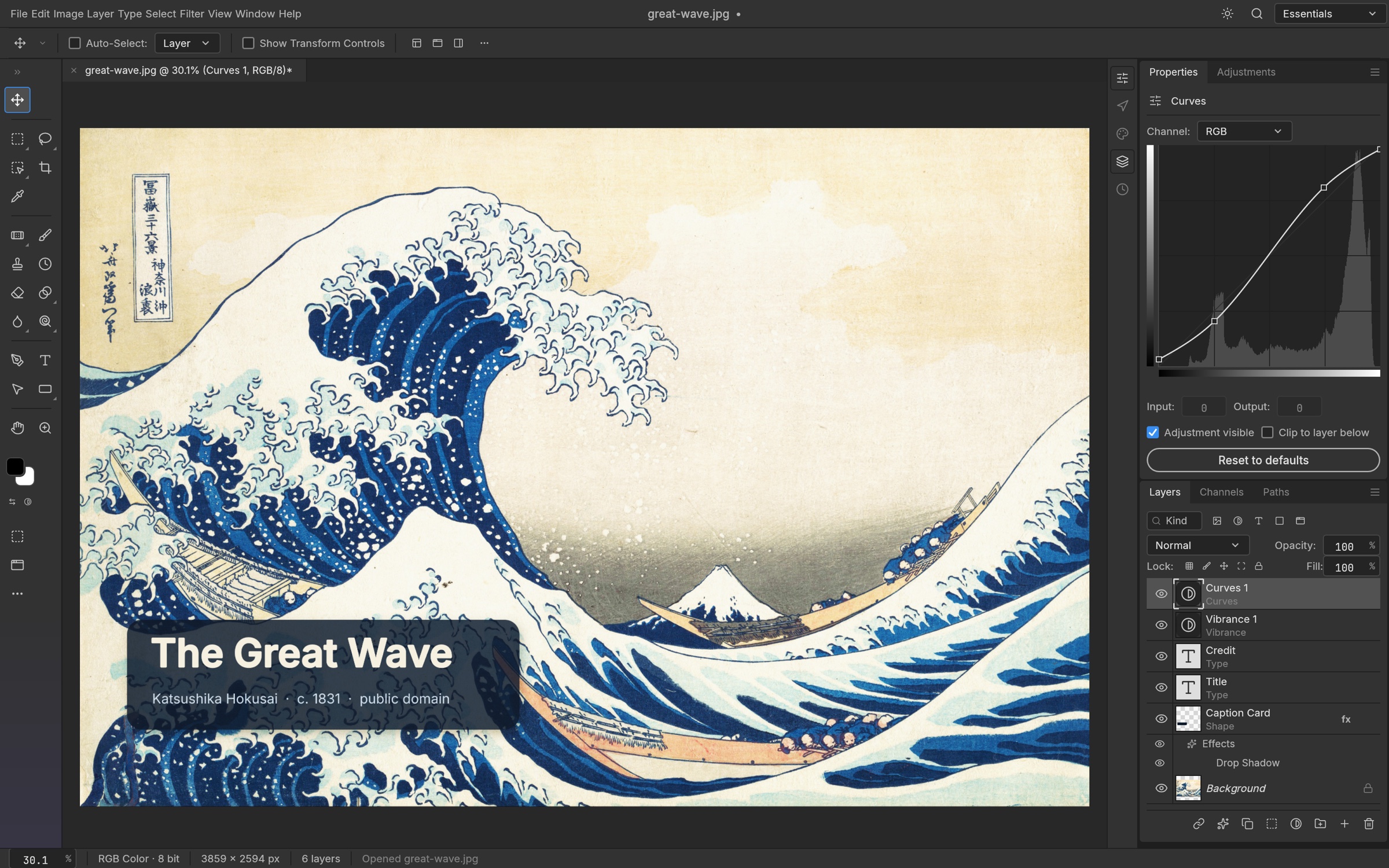
PhotoCraft combines familiar menus and shortcuts with a native GPU canvas using Metal, Vulkan, DirectX 12 or WebGPU. The documented feature set includes 16 adjustment layers, live-preview filters, smart objects, masks, type and brushes. Color workflows cover 8-, 16- and 32-bit documents, RGB, CMYK, Lab and Grayscale, ICC profiles and soft proofing.
For developers, the same command engine is exposed through the UI, CLI, JSON control channel and MCP server. This makes scripted editing a distinct reason to evaluate PhotoCraft. It does not establish compatibility with every agent or parity with every Photoshop tool: the README identifies missing tools and professional-workflow gaps.
Sources: PhotoCraft README (reviewed snapshot) · Official PhotoCraft download
PhotoCraft PSD Support
PhotoCraft reads and writes layered PSD and PSB documents. The reviewed README reports preserved rendering for 307 of 309 psd-tools test files. That is a project-reported corpus result, not our benchmark or a guarantee for your document. It explicitly distinguishes visual preservation from byte-identical saving: the application rewrites parts of the file, while a separate PSD parsing library has its own round-trip tests.
Other documented formats include layered TIFF and OpenRaster. Krita, Affinity and HEIC support has import-specific limits; Affinity export is unavailable. Test a copy containing your actual effects, fonts, masks and color profiles, then inspect the exported result in the application used by your collaborators.
PhotoCraft vs Photoshop
Scroll sideways to compare with Adobe Photoshop
| Compare | PhotoCraft | Adobe Photoshop |
|---|---|---|
| Cost | Free, open source | Paid desktop subscription; plans vary |
| Desktop platforms | Windows, macOS, Linux and FreeBSD | Windows and macOS listed by Adobe |
| PSD workflow | Layered import/export with documented limits | Adobe's native editing workflow |
| Readiness | Early alpha; professional-workflow gaps | Established commercial editor |
PhotoCraft is worth evaluating for Linux workflows, occasional editing without a subscription, or command-driven automation. Photoshop is the stronger starting point when your work depends on its established production workflow, plugins or generative features. PhotoCraft's own alpha warning matters more than the number of commands exposed in its menus.
Sources: PhotoCraft README (reviewed snapshot) · Adobe Photoshop plans and features · Photoshop desktop requirements
ArtCraft: The Full Suite of Crafting Apps
PhotoCraft belongs to ArtCraft's family of creative applications. VectorCraft covers illustration; FilmCraft edits video; LightCraft manages photos and raw development; PdfCraft handles PDF documents. EffectCraft focuses on motion graphics, DesignCraft on publishing, FigCraft on interface design, and WordCraft on documents.
SoundCraft covers audio production, DeckCraft presentations, CADCraft drafting, and GridCraft spreadsheets. These are separate applications with their own maturity and requirements. Use the official app directory to choose one; the ArtCraft PdfCraft entry should not be confused with unrelated products sharing a similar name.
Sources: Official ArtCraft apps
PhotoCraft Alternatives
For browser-based PSD editing, compare Photopea. For another free, open-source desktop image editor, consider GIMP. Choose using a representative file and the operations you actually need, especially typography, masks and export fidelity.
The related LaunchVault listing below focuses on AI-assisted image changes from prompts. It is an adjacent workflow, not evidence of equivalent layered PSD editing or a drop-in Photoshop replacement.
Sources: Photopea documentation · GIMP official site · Image AI Editor