By LaunchVault editorial · Official sources checked
Universal Modder is a free, MIT-licensed toolkit for AI-assisted modding of PC games you own. It combines reusable skills, the Python um CLI and a shared knowledge base with optional asset-generation services. Claude Code, Codex and other agents can follow its workflow from game inspection to testing and packaging.
This documentation-based review covers installation, costs and limitations. We have not reproduced the showcase mods or audited the toolkit. Results depend on the game, version, loader and permissions; the project's broad scope is not a guarantee that every game or requested modification will work.
What Is Universal Modder?
The toolkit supplies task-specific instructions, local utilities and a fal MCP integration. Its knowledge base stores field notes with working versions, chosen routes, verification evidence and pitfalls. Contributors can propose notes through pull requests; publishing remains a human decision.
We reviewed commit 6a8865a on October 18, 2026. GitHub had no release tags or published releases at that check, so there is no release number to recommend. The README still describes the universalmodder.com Mod Hub as forthcoming; GitHub is the installation source used here.
Sources: Official README (reviewed snapshot) · GitHub releases
How to Install Universal Modder
Choose one route for your existing agent. These are the maintainer's documented commands, not installation tests performed by LaunchVault. Run Claude's slash commands inside Claude Code; run CLI commands in a terminal. Skills-only installation does not automatically supply every CLI dependency or MCP credential.
Scroll sideways to see all columns
| Agent | Documented installation |
|---|---|
| Claude Code | /plugin marketplace add rehan-remade/universal-modder /plugin install universal-modder@universal-modder |
| Codex | codex plugin marketplace add rehan-remade/universal-modder codex plugin add universal-modder@universal-modder |
| Gemini CLI | gemini extensions install https://github.com/rehan-remade/universal-modder |
| VS Code / Copilot | Enable chat.plugins.enabled → Chat: Install Plugin From Source → enter the repository URL. |
| Cursor | Use the marketplace route or clone the repository; the clone includes AGENTS.md and .cursor/mcp.json. |
| OpenCode | Clone and run opencode inside the repository. OpenCode 2 plugin: opencode plugin add 'github:rehan-remade/universal-modder#main::path:plugins/opencode' (add skills separately). |
| Skills-only clients | npx skills add https://github.com/rehan-remade/universal-modder |
Sources: Official README (reviewed snapshot) · OpenCode plugin details
Install the um CLI & Check Requirements
The README requires Git, Python 3.10+ and ffmpeg, recommends uv, and uses Blender for 3D-to-sprite rendering. Windows game automation runs natively or through WSL. Do not assume that installing the Python package makes every game-automation workflow portable to macOS.
Claude Code's session hook makes um available on PATH. Other plugin installations require a separate CLI installation. Use the command below, or pipx with the same Git URL, and inspect um --help before choosing a subcommand.
uv tool install git+https://github.com/rehan-remade/universal-modder
um --help
Sources: Official README (reviewed snapshot) · Python package requirements
How to Use Universal Modder
Begin with inspection and a small change. The documented sequence is: search prior notes, identify the engine and route, prepare backups, inspect the actual code, build a working slice, create assets, verify in-game, record evidence, package, and write a field note. Instructions describe the intended process; confirm that each step actually happened.
I own this PC game. Identify its engine, version and supported modding route.
Check existing field notes and propose a small cosmetic mod.
Do not change game files or saves yet; explain the backup and rollback steps.
Sources: Official README (reviewed snapshot) · Project safety and publishing rules
Using Universal Modder with Claude Code
A normal single-agent session is the starting point. For longer projects, mod-orchestrator coordinates mod-game-worker, which touches the running game, and mod-offline-worker, which handles offline work. The README warns that a three-agent setup uses substantially more tokens. It also marks other clients' agent-folder behavior as untested rather than promising identical orchestration.
claude --agent mod-orchestrator
# From a repository clone instead:
claude --plugin-dir . --agent mod-orchestrator
Sources: Official README (reviewed snapshot)
Universal Modder Minecraft Mods & Examples
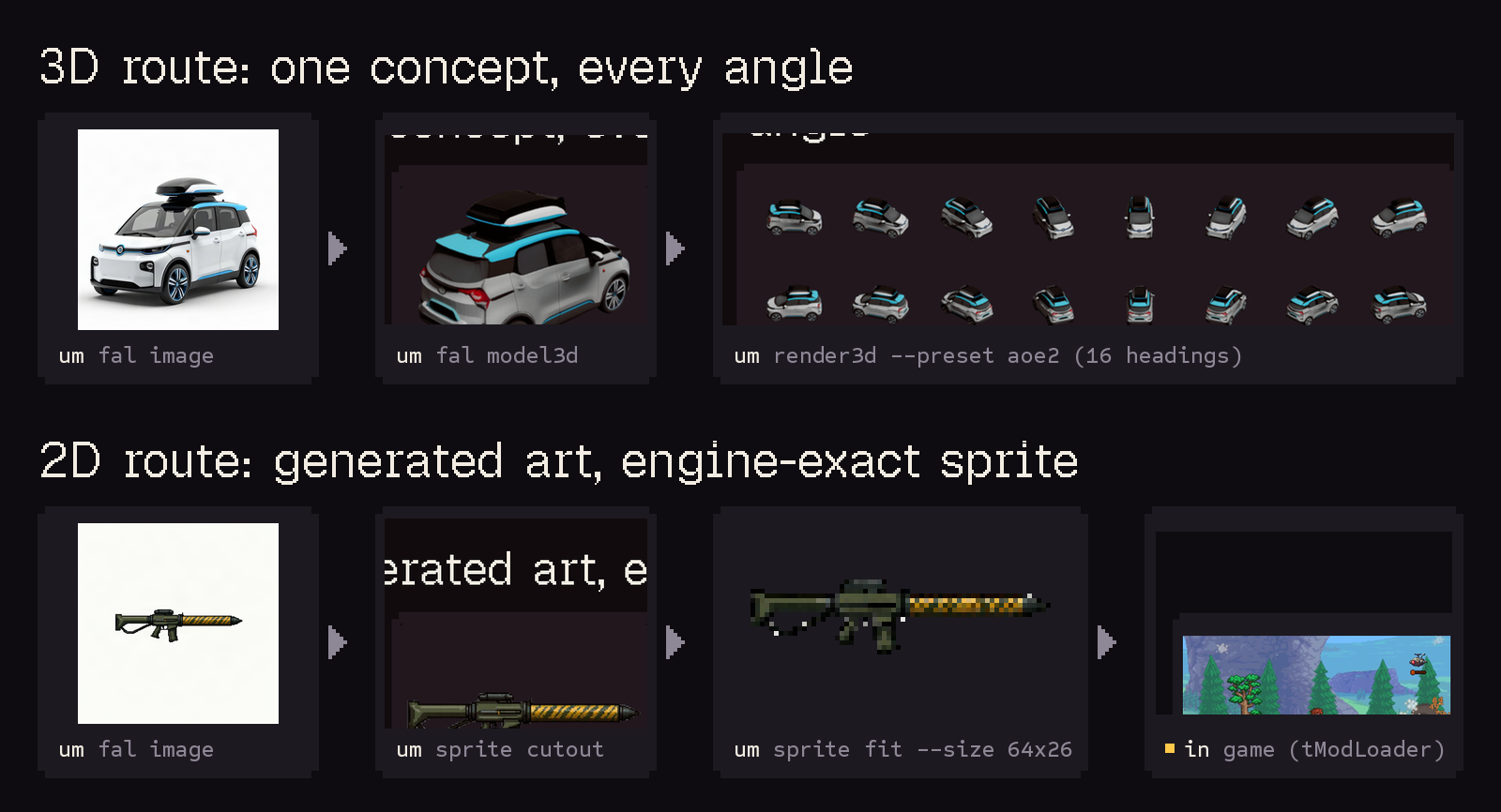
The repository includes a Minecraft × GTA V story-mode example, a Terraria tModLoader mod and an Age of Empires II civilization. Community notes describe Portalcraft, Halo content experiments in Minecraft and Bloons TD 6 in Minecraft. These are documented examples, not compatibility certifications or permission to redistribute another game's assets.
Sources: Official README (reviewed snapshot) · Minecraft × GTA V example · Community field notes
Supported Games & Engines
The engine playbooks discuss Unity, Unreal, .NET/XNA, Godot, Source, Bethesda, Minecraft, AoE2, Bannerlord and several native or indie engines. A listed playbook is a research starting point. Check the precise game build, mod loader and protection boundaries before expecting a working mod.
Sources: Official README (reviewed snapshot) · Main modding skill
Skills & um CLI Commands
The reviewed README lists twelve skills. Each covers one part of the workflow; choose the task you need rather than assuming every tool must run.
Scroll sideways to see all columns
| Skill | Purpose |
|---|---|
| mod-any-game | Coordinate the overall modding route |
| game-recon | Inspect engine, version and loaders |
| game-research-websearch | Research community sources and prior work |
| reverse-engineering | Inspect code and formats with analysis tools |
| fal-assets | Generate art, 3D and audio |
| asset-pipeline | Convert assets for the target engine |
| game-automation | Operate and inspect the running game |
| showcase-video | Record and edit a demonstration |
| mashup-mods | Explore cross-game workflows |
| publish-mod | Check and package a release |
| port-a-mod | Adapt a mod to another version or loader |
| share-field-notes | Record findings for review and reuse |
Sources: Official README (reviewed snapshot)
um Command Reference
Use each command's --help for arguments and prerequisites. Credentials, input automation and publishing need particular care; a command name alone does not establish a safe configuration.
Scroll sideways to see all columns
| Command | Purpose |
|---|---|
| um scan | Inspect installed games and likely modding routes |
| um fal / um sprixen | Call optional asset services |
| um comfy | Use a local ComfyUI server |
| um sprite / um render3d | Prepare sprites or render 3D views |
| um win / um video | Automate Windows and prepare recordings |
| um backup | Snapshot, compare and restore saves |
| um publish check | Check a release for common prohibited contents |
| um kb | Search, write and check field notes |
Sources: Official README (reviewed snapshot)
How Much Does Universal Modder Cost?
There is no toolkit license fee, but agent usage and optional generation can cost money. fal OAuth changes how you authenticate; it does not make generation free. Local ComfyUI avoids fal API charges but still uses hardware, power and models with their own terms. Check provider rates before a long run.
Scroll sideways to see all columns
| Item | Cost boundary |
|---|---|
| Universal Modder | MIT-licensed; no repository license fee |
| AI coding agent | Your selected subscription, API or local model costs |
| fal | Usage-based charges; model and settings matter |
| Local ComfyUI | Local compute and setup costs |
| Sprixen | Separate credit-based service and API access; not bundled |
Sources: Official README (reviewed snapshot) · fal pricing · fal MCP authentication · Sprixen plans and credits
Is Universal Modder Safe & Legal?
The project targets games you own and requires respect for each game's terms. Its rules prohibit multiplayer cheating, bypassing anti-cheat or ownership protections, and distributing game files or decompiled code. They allow appropriate offline, official modding and user-hosted-server workflows; multiplayer is not categorically excluded.
The workflow calls for backups before changing saves and permission before input automation, loader installation or publication. um publish check detects common packaging problems, not every legal or security issue. Review the output and permissions yourself. Owning a game does not automatically authorize every modification or distribution.
Sources: Project safety and publishing rules · Contribution rules
Does Universal Modder Work on Mobile?
The main README documents PC-game workflows and Windows automation. We did not verify a mobile installation path or a supported phone app. Treat mobile compatibility as unconfirmed rather than assuming a universal platform promise.
Sources: Official README (reviewed snapshot)
Universal Modder Alternatives
For a specific game, its official mod kit or established community loader may be a more direct starting point. REA is an adjacent tool for connecting agents to reverse-engineering engines; it is not a game-modding replacement or a verified Universal Modder integration. The related listings below cover different parts of an agent workflow.
Sources: Reverse-engineering skill and integrations · LaunchVault's step-by-step Universal Modder tutorial